
Converting the timestamps
As mentioned previously we’re going to start this post by creating a new column called “date” (which in hindsight I should have named datetime) by applying the convert_time function we created to the timestamp column.
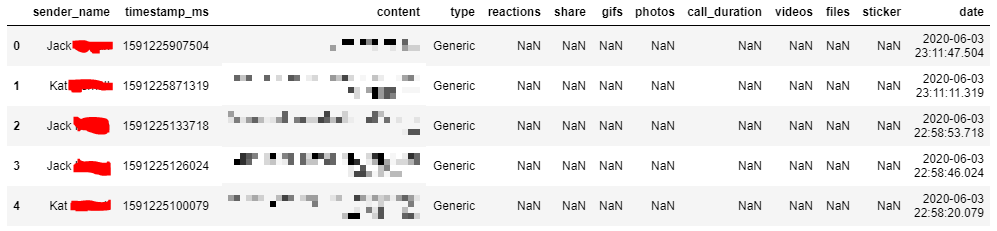
Line 22 shows the function to add that column to the messages database. I use the head() function to show me only the first 5 rows of the database as seen in line 24 and the picture to the right.
messages['date'] = messages['timestamp_ms'].apply(convert_time)

messages.head(5)
def get_date(date):
    return date.date()
def get_month(date):
    return date.month
def get_year(date):
    return date.year
def get_day(date):
    return date.day


messages['just_date']= messages['date'].apply(get_date)
messages['month'] = messages['date'].apply(get_month)
messages['year'] = messages['date'].apply(get_year)
messages['day'] = messages['date'].apply(get_day)
Splitting up the datetime
Next we want to split the datetime up into columns which show the date. We do this in the exact same way as the previous step.
First we define a function or in this case four. The functions get_date, get_month, get_year and get_day use the functions date, month, year and day respectively from the datetime module.
These return the full date, the month, the year and the day when applied to the datetime.
Lines 25-32 create new columns by applying the functions to the datetime column date.
Fixing the text
We’re gonna move away from time and come back to that later. Next up I wanted to fix the text because there is still ‘bad’ Unicode characters inside it which I think is the fault of how facebook encrypts things but i’m not sure.
Luckily there is a package called ftfy which fixes broken unicode. I installed it and then defined a function called get_text which fixes the text, as demostrated in lines 46 and 47.
pip install ftfy

from ftfy import fix_text

def get_text(text):
    return fix_text(text)

get_text('Same, Iâ\x80\x99m literally drifting off in Pret ð\x9f\x98\x82')
#"Same, I'm literally drifting off in Pret ?"
messages['content'] = messages['content'].fillna('')
new_messages = messages

content = new_messages['content'].apply(get_text)
Content
I want to apply the text fix to all the messages. To start with I had to remove the Null values in the content column of the dataframe, these would have been messages which were pictures or gifs only.
I used fillna(”) which replaced the NaN with a space. I considered removing the row that had NaN but I still wanted to count it as a message so I decided to keep it as just an empty message.
I then applied the get_text function to the column.
That’s it for this post but I will begin next post with attempting a sentiment analysis on the content of the messages.